



Lesson 8. Static analysis for detecting 64-bit errors
- Static code analysis
- Static analysis for detecting 64-bit errors
- Viva64 analyzer included into PVS-Studio
Static code analysis
Static code analysis is a methodology of detecting errors in program code relying on studying the code fragments marked by the static analyzer by the programmer. The marked code fragments are most likely to contain errors of some particular kind.
In other words, a static analysis tool detects those places in the program text which are subject to errors or have bad formatting. Such code fragments are left for the programmer to study them and decide if they must be modified.
Static analyzers may be general-purpose (for example, Microsoft PREFast, Gimpel Software PC-lint, Parasoft C++test) and special-purpose to search for some particular error classes (for example, Chord to verify concurrent Java programs). Usually static analysis tools are rather expensive and require that you know how to use them. They often provide rather flexible yet complicated subsystems of settings and false alarm suppression. Because of this static analyzers are used, as a rule, in companies providing a mature level of software development processes. In exchange for being complicated to use static code analyzers allow programmers to detect a lot of errors at the early stages of program code development. The practice of using static analysis also disciplines programmers and helps managers control young employees.
The main advantage of static code analyzers is an opportunity to greatly reduce the costs of eliminating defects in a program. The earlier an error is detected, the less expensive it is to correct it. Thus, according to the book "Code Complete" by McConnell, correction of an error at the stage of testing the code is five times more expensive than at the stage of designing the code (coding):

Figure 1 - Average costs of correcting defects depending upon the time of their appearance in the code and their detection (the data presented in the table are taken from the book 'Code Complete' by S. McConnell)
Static analysis tools reduce the cost of development of the whole project by detecting many errors at the stage of designing the code.
Static analysis for detecting 64-bit errors
Let us point out the advantages of static code analysis that make this method the most appropriate to detect errors in 64-bit code:
- You can check the WHOLE code. Analyzers can even test those code fragments that get control very seldom. In other words, static analyzers provide nearly full coverage of the code. It allows you to make sure that the whole code has been checked before you port it to a 64-bit system.
- Scalability. Static analysis allows you to analyze both a small and a large project with equal simplicity. Labor intensiveness rises directly as the project size. You may easily distribute the project analysis among several developers. You need just to distribute the project's parts among the programmers.
- While only beginning to work on a project, the developer will not fail to notice possible issues even without knowing all the peculiarities of the 64-bit code. The analyzer will point at the dangerous places and Help system will tell you everything you should know about this or that issue.
- Costs are reduced due to early diagnosis of errors.
- You may efficiently use static analysis tools both when porting code to a 64-bit system and developing a new 64-bit code.
Viva64 analyzer included into PVS-Studio
PVS-Studio is a package of static code analyzers to check contemporary resource-intensive applications. PVS-Studio includes a special static analyzer Viva64 intended for diagnosing 64-bit errors.
PVS-Studio analyzer is designed for a Windows-platform. It integrates into Microsoft Visual Studio 2005/2008/2010 development environment (see Figure 2). PVS-Studio's interface allows you to filter diagnostic warnings using various techniques and also save and load warning lists.
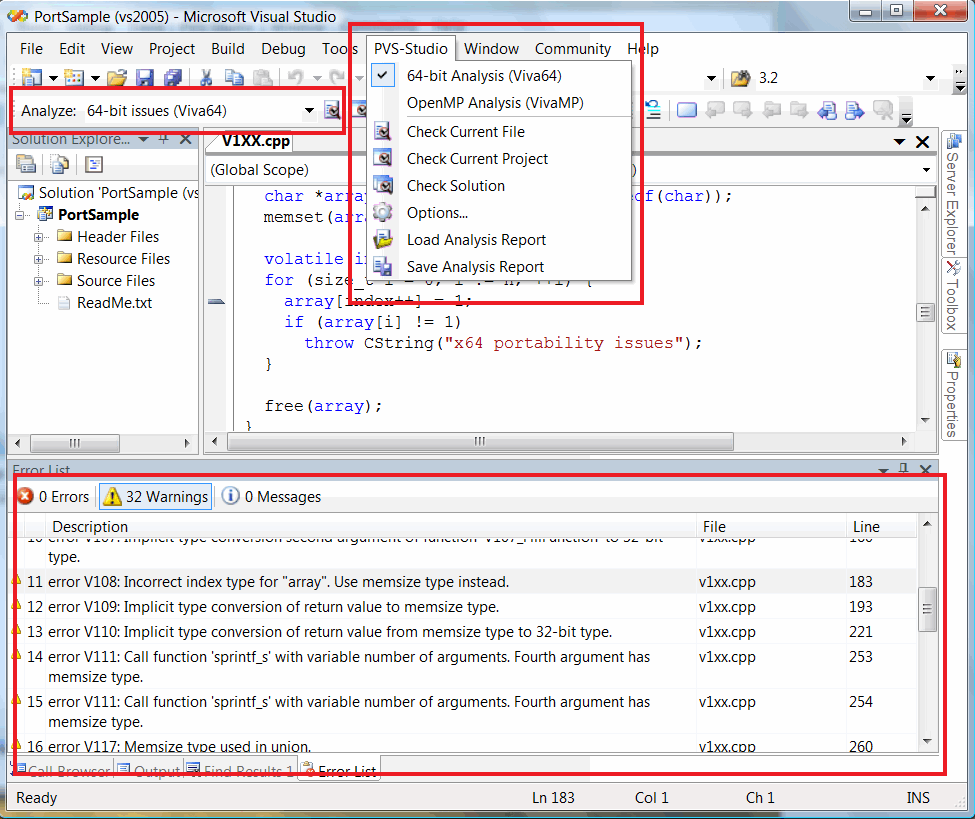
Figure 2 - PVS-Studio integrating into Microsoft Visual Studio
The analyzer's system requirements coincide with those of Microsoft Visual Studio:
- Operating system: Windows 7/Vista/XP/2008/2003 x86 or x64. Note that your operating system does not necessarily need to be a 64-bit one to enable you to analyze 64-bit applications.
- Development environment: Microsoft Visual Studio 2005/2008/2010 (Standard Edition, Professional Edition, Team Systems). You must have a Visual Studio component called "X64 Compilers and Tools" installed to be able to test 64-bit applications. It is included into all Visual Studio versions we have enumerated and can be installed through Visual Studio Setup. Note that PVS-Studio cannot work with Visual C++ Express because this system does not support add-in modules.
- Hardware: PVS-Studio can work on systems that have not less than 1 Gbyte of memory (it is recommended to have 2 Gbytes or more); the analyzer can work employing several cores (the more the cores, the faster the code analysis is).
All the errors that can be diagnosed are thoroughly described in Help system that becomes available after you install PVS-Studio. You may also see Help system on PVS-Studio online on our site.
The PVS-Studio distribution kit also contains special projects serving as examples of code flaws that will help you study the analyzer.
You may download the demo-version. The demo-version has several limitations:
- you may use it within 30 days;
- the demo-version hides the numbers of most lines containing errors and shows only some of them (although it detects all errors in the project). But we made an exception for the demonstration projects included into PVS-Studio - when you analyze these projects, you see all the numbers of the lines with defects.
At present, PVS-Studio analyzer provides the fullest diagnosis of 64-bit errors. You may study the comparison characteristics in the article "Comparing PVS-Studio with other code analyzers".
While studying various patterns of errors in the next lessons, we will often refer to PVS-Studio to show you how to detect them.
The course authors: Andrey Karpov (karpov@viva64.com), Evgeniy Ryzhkov (evg@viva64.com).
The rightholder of the course "Lessons on development of 64-bit C/C++ applications" is OOO "Program Verification Systems". The company develops software in the sphere of source program code analysis. The company's site: http://www.viva64.com.